
Microsoft Audience shows image ads on MSN, Outlook, Microsoft Edge and Microsoft's partner sites. For B2B, you can aim them at people by the company they work for, their industry and their job function. This uses LinkedIn profile data that Microsoft makes available in its own ad platform. PPCmate builds the campaign on Microsoft for you, so you don't need a Microsoft or LinkedIn ad account.
At a glance
- Pricing: CPC (you pay per click). The max CPC must be at least $0.30. Bidding is Enhanced CPC.
- Budget: a daily budget of at least $5 a day.
- B2B targeting countries: United States, United Kingdom, Canada, Australia, France and Germany.
- Creative: one image ad with a business name, headlines, a long headline and a description.
Setting it up
- Go to Campaigns → New Campaign. Choose your goal and switch to Businesses (B2B). Pick Microsoft Audience from the suggestions, or click See all formats and pick it under the Microsoft logo. It's open to every advertiser.
- Under Location, choose at least one of the six B2B countries.
- Under Targeting, open the B2B Audience section and pick at least one of these:
- Company: type 3 or more letters and choose from Microsoft's list.
- Industry: pick one or more industries.
- Job function: pick one or more functions, for example Finance or Purchasing.
- Choose how strict the targeting is (see below), and add any exclusions.
- Create the ad and set the budget and max CPC.
- Save. PPCmate creates the campaign on Microsoft, and Microsoft reviews the ad before it serves.
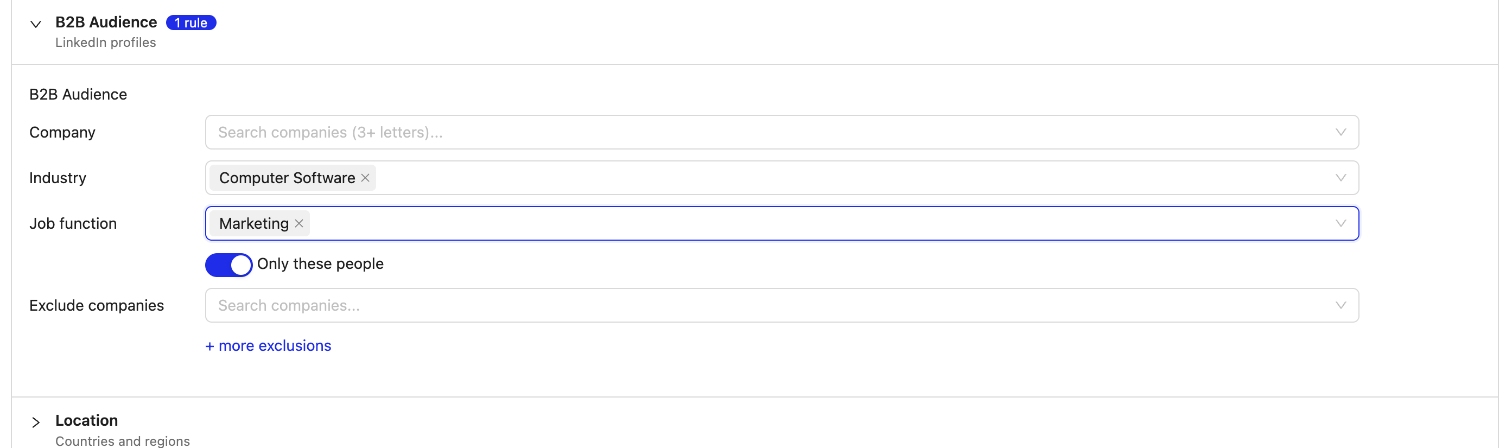
Only these people, or bid higher
- Only these people: on (default). Only people who match your picks see the ad.
- Only these people: off. Your ads reach everyone, and the people you picked get a higher bid. Set it under Bid higher for them (+30% by default, up to +900%).
Exclusions
Exclude companies keeps your ads away from competitors or existing customers. Click + more exclusions to also exclude industries or job functions.
The ad
- Image: 1200 × 628 recommended, at least 703 × 368, JPG or PNG. Microsoft crops other shapes (such as square) from it.
- Business name: up to 25 characters.
- Headlines: up to 30 characters each.
- Long headline and description: up to 90 characters each.
- Microsoft picks the call-to-action button for audience ads, so there is no button to choose.
Use a customer list too
A Microsoft Audience campaign can also use one of your lists in its Customer Lists section. See Customer lists: upload a list and use it on Google, Microsoft and Meta.
Microsoft Audience or LinkedIn?
Both reach people by their work. Microsoft Audience shows image ads on MSN, Outlook and Edge, by company, industry and job function, from $0.30 per click. LinkedIn Ads run in the LinkedIn feed and also target exact job titles, seniority, skills and schools, from $3.00 per click. See LinkedIn Ads from PPCmate.
Troubleshooting
- "Pick at least one company, industry or job function": with Only these people on, you need at least one pick.
- "Microsoft needs a CPC of at least $0.30": raise the max CPC.
- Few or no impressions: the audience is probably too narrow for the budget and bid. Add companies, widen job functions or industries, raise the CPC, or switch Only these people off and use a bid boost instead. B2B audiences cost more per click than broad consumer traffic.
- Ad refused: run Campaign Health Check. It shows Microsoft's reasons. Change the image or texts, and the new ad is sent again and reviewed.
- Restricted categories: PPCmate won't send ads for cryptocurrency, gambling, risky financial products, prescription drugs and pharmacies, adult content or weapons, or links that redirect to a different website.
See also: Microsoft Search Ads (Bing) from PPCmate and Which ad format should I choose?.